Why a scanned PDF will not convert to editable Word text
A page can look like a normal document and still contain no computer-readable words. A scan often stores the entire page as a picture. Extracting editable text from that picture requires optical character recognition, or OCR.
Open PDF to WordCheck whether the PDF contains text
Open the PDF in a viewer and try selecting a sentence, copying it into a text editor, or searching for a visible word. If those actions work sensibly, the file probably contains a usable text layer.
If you can only select the whole page as an image, or search finds nothing, the page may be image-only. Some scans already have an OCR text layer, while other documents mix scanned and text-based pages. Selection is a useful first check rather than a guarantee of perfect conversion.
Convert a PDF with selectable text
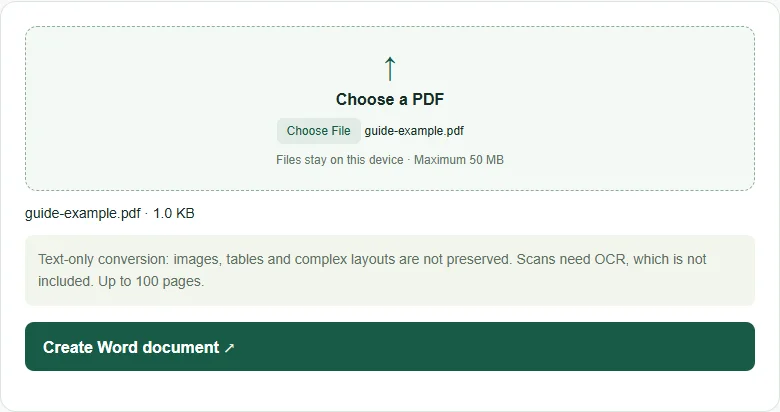
- Open PDF to Word and choose an unencrypted PDF.
- Select Create Word document.
- Download the DOCX file and open it in Word or another compatible editor.
- Check the reading order, line breaks, names and numbers before editing or sharing it.
PDFDesk exports selectable text as editable paragraphs and separates original PDF pages with page breaks. It does not reproduce the original layout, images or table structure. Multi-column pages can require manual correction.
What happens with scanned pages?
If there is no selectable text anywhere in the file, PDFDesk stops and explains that OCR is required. In a mixed document, pages without text are represented by a message in the Word file rather than silently omitted.
PDFDesk’s current converter does not include OCR. Process the scan with an OCR tool first, selecting the document’s language, and then try the resulting searchable PDF. Proofread the recognized text carefully: a mistaken digit in an amount or reference number can be easy to miss.
Use the right workflow
If you only need to add a name, a date or a visible signature, Fill & Sign may be more suitable than converting the whole document. If you need editable paragraphs, PDF to Word is the appropriate starting point when the PDF has a usable text layer.
The converter supports files up to 50 MB and 100 pages. It works locally in your browser; there is no document upload to a conversion server.